Turn your photo into Naruto anime art
Bold ninja-world linework, spiky hair, and the high-contrast cel shading of the Hidden Leaf Village.
Your first portrait is free. No card required.
About the Naruto style
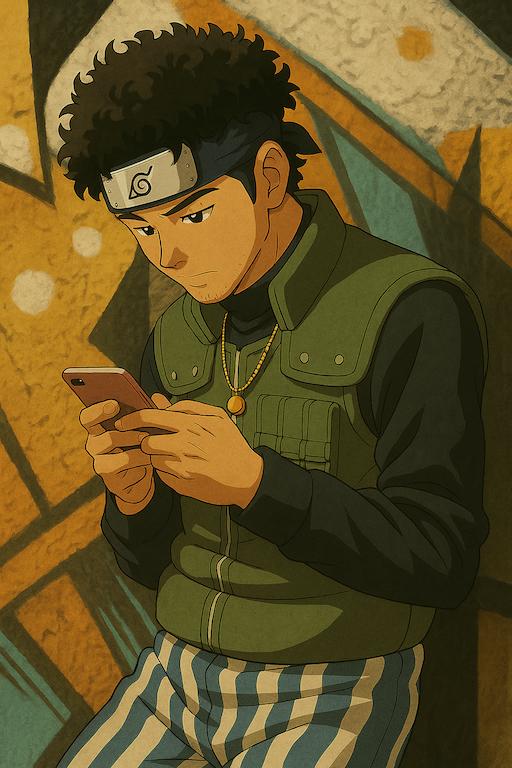
The Naruto anime style is defined by sharp, confident outlines, saturated primary colors, and the dynamic cel shading that made shonen anime iconic. Turning a photo into anime art in this style means exaggerating your features just enough — bolder eyes, sharper jawlines, wind-blown hair — while still keeping the transformation clearly recognizable as you. It's a favorite for profile pictures and Discord avatars for exactly that reason.
Naruto style questions
Will I get a ninja outfit and headband, or just a filter over my normal clothes?
A full reimagining — you're redressed into a coordinated ninja look (an Akatsuki cloak, a Hidden Leaf Jōnin vest, Anbu gear, or a matching village uniform), while your face, hairstyle, and expression stay recognizably yours.
Can I choose which village or organization I show up as?
Not yet as a manual picker — the engine currently selects a coordinated ninja look automatically for a cohesive result. A style-specific outfit selector is something we're considering adding.
Does it keep my glasses or accessories?
The engine preserves your original clothing silhouette and adapts it into the ninja outfit where it can, so accessories and details usually carry through rather than disappearing.
Can I set the scene somewhere specific, like the Hidden Leaf Village?
Yes — Naruto style has three optional backgrounds: Hidden Leaf Village, the Training Grounds, or the Chunin Exam Arena.
Ready to see yourself in Naruto style?
Upload a photo and get your portrait in under a minute.
Create my Naruto portraitOther styles to explore